PHP Security Vulnerabilities: What Every WordPress Owner Needs to Know Right Now
PHP Security Vulnerabilities Explained: Two critical PHP flaws just dropped with a CVSS score of 9.2 out of 10. The NSA is calling them “PHP2Shell.” If you run a WordPress site, a PHP-powered web app, or any cPanel hosting — this affects you directly. Here’s what’s happening, what it means in plain English, and exactly what to do today. CRITICAL — Active Exploitation Expected. Patch immediately.
CERT-EU, CERT-NL, and the NSA all issued advisories on October 21, 2026. Public proof-of-concept exploits are already circulating. The NSA expects malicious actors to weaponize these flaws. Affected versions: PHP 8.2 < 8.2.35, PHP 8.3 < 8.3.36, PHP 8.4 < 8.4.27, PHP 8.5 < 8.5.12. PHP 8.1 and older: no official patch, end-of-life.
Table of Contents
I Woke Up to This and My First Thought Was My WordPress Site
I run a WordPress site. I use cPanel hosting. When I see a security advisory with CVSS 9.2 — that’s basically the highest severity score you can get before it hits 10.0 — my first instinct is to check whether my site is at risk before I write a single word.
Let me be direct: if your site runs PHP (and WordPress runs on PHP), this is not a “patch it whenever” situation. The NSA — the US National Security Agency — issued an advisory saying they expect hackers to weaponize this. CERT-EU, the European Union’s cybersecurity team, put out their own advisory the same day. When agencies at that level are warning simultaneously, it’s time to pay attention.
These two vulnerabilities are being collectively nicknamed “PHP2Shell” — because they can let an attacker get a shell (full command-line access) on your web server without needing any login credentials. No username. No password. Just a crafted HTTP request to your server. Let me explain exactly what’s broken and why it’s so dangerous.
The Two CVEs — What Actually Broke in PHP
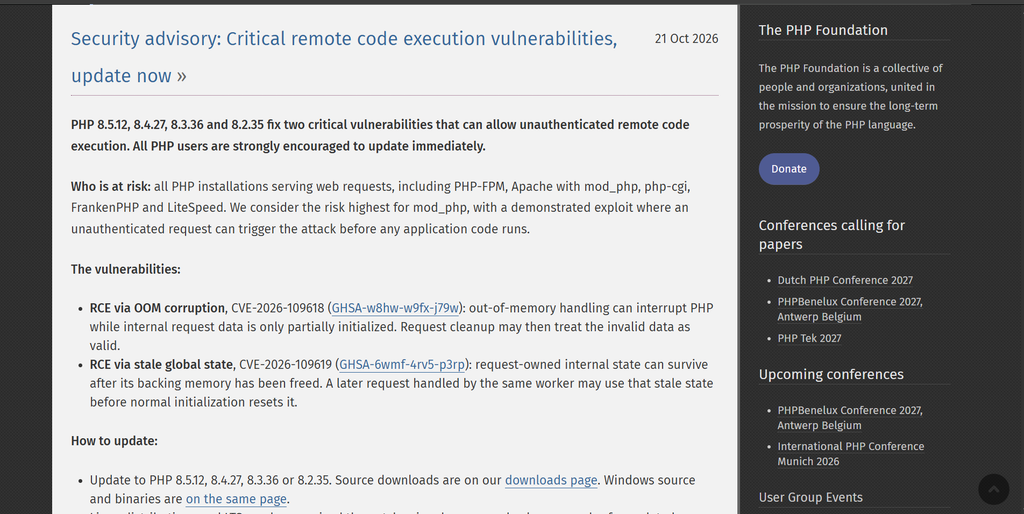
There are two separate vulnerabilities, both with a CVSS score of 9.2. Either one alone is serious. Together, they give attackers multiple paths into the same door.
CVE-2026-109618: Memory Corruption During File Upload / Out-of-Memory Handling
CVSS 9.2 · CRITICAL
When a PHP request hits the memory_limit cap mid-way through a file upload, PHP’s cleanup code can try to free memory that was never fully initialized. This corrupts memory in a way an attacker can control — and from memory corruption, you can get code execution.
CVE-2026-109619: Stale Global State — Request Data Leaks Across Workers
CVSS 9.2 · CRITICAL: After a fatal PHP error, global request state (user data, session info, form inputs) isn’t always fully cleared before the same worker handles the next request. The next request can read, and potentially influence, data left over from the previous one — including data the attacker deliberately planted.
Let me translate both of these out of security-speak into something a developer actually understands.
CVE-2026-109618 in Plain English — The File Upload Trap
PHP has a setting called memory_limit. It defines the maximum memory any single PHP request can use — typically 128M or 256M. This is a safety valve to prevent one badly-written script from eating all your server’s RAM.
The bug lives in what happens when a file upload request hits that memory limit mid-process. Think about what PHP is doing during a file upload: it’s reading the HTTP request body, parsing the multipart form data, allocating memory for the file contents, and building PHP superglobals like $_FILES. This all happens in sequence.
If the memory limit is hit between steps — say, after the file data has been read but before $_FILES is fully initialized — PHP triggers its cleanup routine to free the memory. The problem: the cleanup routine tries to free a pointer to data that was never properly initialized in the first place. That’s a classic “use-after-free” class of memory corruption bug.
Why this is exploitable
An attacker can deliberately craft an HTTP request that’s the exact right size to trigger the memory limit at the exact right moment. By controlling the size and content of the uploaded data, they can influence what ends up in the freed memory — which is exactly how you build a working exploit. CERT-EU confirmed that public proof-of-concept code for this is already circulating.
CVE-2026-109619 in Plain English — The Ghost Data Problem
PHP-FPM (the way most modern web servers run PHP) uses a pool of worker processes. When a request comes in, a worker handles it and then either stays alive for the next request or is recycled. This is efficient — spinning up a new process for every page load would be slow.
The bug here is that when a PHP script dies with a fatal error, the global state it was building — $_POST, $_SESSION, $_SERVER variables, internal buffers — isn’t always fully reset before that same worker takes the next request. A ghost of the previous request’s data is still sitting in memory.
Now imagine an attacker sends a crafted request that intentionally triggers a fatal error after planting specific data into those global variables. The next request hitting that same worker — which could be a totally innocent user visiting your homepage — sees the attacker’s planted data as if it were legitimately part of their request.
Real-world consequence
In the worst case, this allows an attacker to inject data into a subsequent request’s $_SESSION or authentication context — effectively hijacking another user’s session or bypassing authentication checks. Combined with CVE-2026-109618, an attacker can chain both vulnerabilities to achieve unauthenticated remote code execution.
A Real Attack Scenario — What Happens to a WordPress Site
Let me walk through exactly what an attack looks like on a typical WordPress site running an unpatched PHP version. This isn’t theoretical — this is what the proof-of-concept exploits being circulated are designed to do.
- Attacker scans for vulnerable PHP versions
Automated scanners (already deployed post-advisory) probe sites by sending crafted HTTP headers that reveal PHP version via error responses or default headers. WordPress sites are trivially identifiable by URL patterns like /wp-login.php or the X-Powered-By: PHP/8.3.x header.
2.Exploit CVE-2026-109618 via WordPress file upload
WordPress’s media uploader, plugin upload endpoints (/wp-admin/update.php), and theme upload functionality all accept file uploads. The attacker crafts a multipart POST request with a body sized precisely to hit memory_limit mid-parse, triggering the memory corruption bug — even without being logged in, by targeting public-facing upload endpoints.
3. CVE-2026-109619 is used to persist state across requests
The attacker deliberately triggers a fatal error on the corrupted worker, planting data in the stale global state. The next request to that worker inherits the attacker’s planted session data — potentially granting admin-level access without valid credentials.
4. Shell access achieved — PHP webshell dropped
With code execution, the attacker uploads a PHP webshell — a small file like shell.php inside /wp-content/uploads/ — that gives them a persistent, interactive command line on your server. From here they can read every file on the server, steal your database credentials, your WordPress admin password hash, your users’ email addresses, and payment data if WooCommerce is installed.
5. Data exfiltration and lateral movement
With a shell on the server, the attacker reads wp-config.php to get your database credentials in plaintext, dumps your entire WordPress database, and may pivot to other sites hosted on the same cPanel account. If you host multiple domains on shared hosting, all of them are now compromised.
Your WooCommerce store gets hit at 2 AM while you’re asleep.
You wake up to find customer orders still coming in — nothing looks broken on the front end. But overnight, an attacker gained shell access via PHP2Shell, read your wp-config.php, dumped your entire WooCommerce customer table (names, email addresses, order history, and hashed passwords), and left a webshell behind for persistent access.
You won’t know this happened until: (a) a customer reports suspicious emails from a phishing campaign using data from your store, (b) your hosting provider alerts you about unusual outbound traffic, or (c) Google flags your site in Search Console for serving malware. By then, the damage is done — and depending on your location and the nature of your customers, you may have GDPR or data protection reporting obligations.
This is not a worst-case scenario. This is the standard playbook for automated PHP exploitation. The reason it’s so dangerous is that it requires zero human error on your part — no phishing, no weak password, no bad plugin. Just an unpatched PHP version.
Which PHP Versions Are Affected?
| PHP Branch | Status | Vulnerable if below | Patched version |
|---|---|---|---|
| PHP 8.5 | Active | 8.5.11 and below | 8.5.12 |
| PHP 8.4 | Active | 8.4.26 and below | 8.4.27 |
| PHP 8.3 | Active | 8.3.35 and below | 8.3.36 |
| PHP 8.2 | Active (security only) | 8.2.34 and below | 8.2.35 |
| PHP 8.1 | End-of-life — no official patch | All versions | No patch available |
| PHP 8.0 and below | End-of-life — no official patch | All versions | No patch available |
WordPress sites especially at risk
Many WordPress installs — especially on shared cPanel hosting — are still running PHP 7.4 or PHP 8.1 because it’s the default in older cPanel configurations. PHP 8.1 reached end-of-life in December 2025. If you’re on 8.1 or below, there is no official patch. You need to upgrade your PHP version, not just update the patch.
How to Fix This on cPanel/WHM Hosting (The Common WordPress Host Setup)
cPanel pushed patched EasyApache4 packages on October 21, 2026 — the same day the advisory dropped. If you’re on cPanel hosting, here’s exactly what to do.
- Check your current PHP version
In cPanel → Software → Select PHP Version. Or check your site’s PHP info page if it’s enabled. Note your current version number against the table above to confirm whether you’re on a patched build.
2. Update cPanel/WHM (if you have WHM access)
Run the update script: /scripts/update-packages from the WHM terminal. Or use WHM → Updates → Update System. The patched WHM versions are 11.110.0.15, 11.134.0.66, 11.136.0.50, and 11.138.0.18.
3. Refresh package repositories first
On CentOS/RHEL: yum clean all && yum makecache. On Ubuntu/Debian: apt clean && apt update. This ensures you pull the latest patched packages and not a cached older version.
4. Verify the patch applied correctly
On CentOS/RHEL, check the changelog: rpm -q --changelog ea-php83-php-cli | grep -m1 CVE-2026-109618 (replace php83 with your version). On Ubuntu: zgrep CVE-2026-109618 /var/lib/dpkg/info/php8.3-cli.md5sums
5. If on PHP 8.1 or below — upgrade your PHP version
In cPanel → MultiPHP Manager, switch your WordPress domain to PHP 8.2, 8.3 or 8.4. Test your site after switching — most modern WordPress themes and plugins are 8.2+ compatible. PHP 8.1 is end-of-life and will receive no security patches, now or in future.
Temporary Mitigations If You Can’t Patch Immediately
If you’re on managed hosting and can’t control your PHP version directly, or if your host hasn’t pushed the update yet, CERT-EU published temporary mitigations that reduce — but do not eliminate — the risk:
php.ini — temporary mitigations (not a full fix); CVE-2026-109618 mitigation — disable upload progress tracking session.upload_progress.enabled = 0 ; CVE-2026-109619 mitigation (PHP 8.5 only) — disable fatal backtraces fatal_error_backtraces = 0 ; Reduce POST body size at PHP level — limits attack surface; 8M for non-upload pages, 32M if you need file uploads post_max_size = 8M
At your web server (nginx/Apache), you should also enforce request body size limits and consider rate-limiting file upload endpoints. But I want to be clear: these mitigations are a speed bump, not a wall. Researchers at CERT-EU explicitly say they reduce risk but don’t fully fix the vulnerability. Patch is the only real solution.
On managed WordPress hosting (WP Engine, Kinsta, Flywheel)
Major managed WordPress hosts have already rolled out patches at the infrastructure level. Check your hosting dashboard or their status page — most pushed silent updates on October 21–22. You can verify by checking your PHP version in the dashboard against the patched version table above.
What If My Site Is Running an Old WordPress Version Too?
This is a PHP-level vulnerability, not a WordPress-level one. Updating WordPress itself won’t patch these CVEs — you need to update the PHP version your server is running. That said, running an outdated WordPress version alongside unpatched PHP is compounding your risk significantly.
Old WordPress versions often have their own unpatched vulnerabilities that give attackers additional entry points. If an attacker can’t exploit PHP2Shell directly against your specific configuration, an old WordPress plugin or outdated theme might give them an alternative path.
The combination to avoid: WordPress on PHP 8.1 or below, with outdated plugins. That is the highest-risk configuration right now and should be remediated as a priority.
Bottom Line. This is the most serious PHP vulnerability in years. Patch today, not this week.
CVSS 9.2, NSA advisory, public exploits already circulating, and every major PHP version in active use is affected. If you run a WordPress site on cPanel or any PHP-based hosting, your server is a target. The patched versions (8.2.35 / 8.3.36 / 8.4.27 / 8.5.12) are available now. The update takes five minutes in cPanel. The consequences of not updating could take months to recover from — data breach notifications, lost customer trust, Google blacklisting your site.
Check your PHP version. Update it today. If you’re on PHP 8.1 or below, this is also your sign to finally upgrade — that branch has been end-of-life since December 2025 and will never receive another security patch.